Account access · IQ Option
IQ Option Login and Sign-Up in the Philippines


You log in to IQ Option at iqoption.com or in the official app. This page lists the official addresses, shows how to sign up and verify, and fixes the login problems people run into most often.
Official IQ Option login addresses
These are the places where you can sign in to IQ Option, and everything else is a different site. Your login works on all of them, and one account covers both the demo and the real balance.
| Where | Address or source | Note |
|---|---|---|
| Web login | iqoption.com/en/login | The main English login page. |
| Web login (short address) | login.iqoption.com | Goes to the same sign-in. |
| Web login in Filipino | iqoption.com/ph/login | Filipino-language interface. |
| Sign-up page | iqoption.com/en/register | Opens a new account. |
| Browser app (PWA) | iqoption.com | Add it to your home screen from the browser. It opens like an app. |
| Android | Google Play: "IQ Option , Trading Platform" | Developer shown as IQ Option. An APK is also available, see the download guide. |
| iPhone and iPad | App Store: "IQ Option , Trading Broker" | Published by IQOPTION EUROPE LTD in the store listing. |
| Windows and Mac | Installers from iqoption.com | Requirements are in the download guide. |
Sites with similar names
Some sites use names close to IQ Option, for example iqoptions.net and iq-option.com. IQ Option does not run them and they are not where you log in. One of them says on its own login page that IQ Option does not cooperate with it.
- Type iqoption.com yourself, use a bookmark or open the official app, and check the address bar before you enter a password.
- Do not share your password or any confirmation code with anyone, including people who say they work for IQ Option.
- IQ Option only accepts payments from accounts in your own name, so never send money to a personal account because someone asked you to.
- This guide has no login form and never collects your details.
How to log in to IQ Option
On the web
Go to iqoption.com/en/login, enter your email and password and press the login button. If you registered with Google or Facebook, use that button instead.
In the app
Open the IQ Option app from Google Play or the App Store and enter the same email and password on the login screen. The download guide explains which app to install.
On Windows and Mac
The Windows and Mac apps take an email and password only, so if you signed up with Google or Facebook, set a password first with Forgot password using the email linked to that account.
Demo and real balances
They share one login, and you switch between them by tapping the balance at the top of the platform. The demo starts with $10,000 in virtual funds and you can top it up; how to trade on IQ Option covers a first demo trade.
Go to the IQ Option loginHow to sign up and verify your account
Sign-up takes a few minutes. You need an email address and must be 18 or older, and each person can have one account.
- Open the sign-up page. Go to iqoption.com/en/register or open the official app.
- Choose your country. Select the Philippines as your country of residence.
- Enter your email and a password. The password needs at least 6 characters. You can also continue with Google or Facebook.
- Confirm your age and the terms. Tick the box that says you are 18 or older and accept the Terms and Conditions, Privacy Policy and Order Execution Policy.
- Pass the captcha and create the account. Complete the captcha and press Create an account. The demo account with $10,000 in virtual funds is ready straight away.
- Add your personal details. Enter your name and the other details the form asks for, exactly as they appear on your ID.
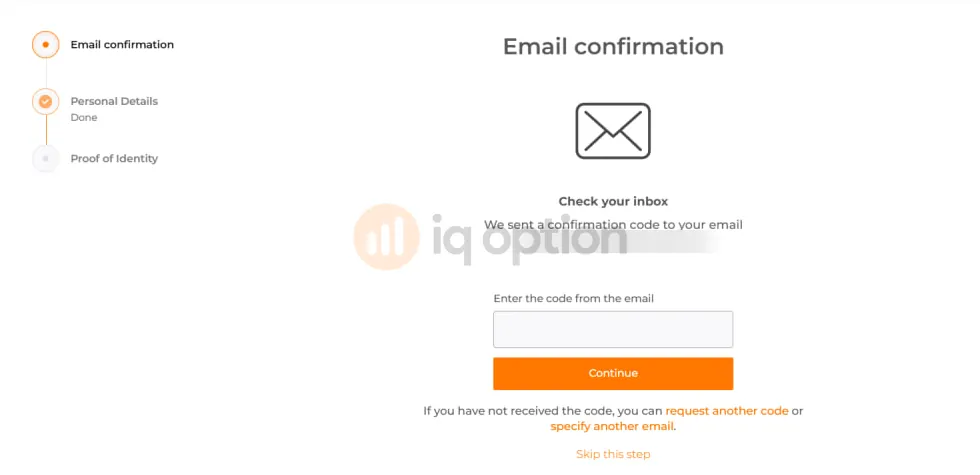
- Confirm your email. IQ Option sends a code to your inbox. Enter it, or skip the step and do it later.
- Upload proof of identity. Attach a photo or scan of your ID, or choose Attach documents later.
The real account currency is set at your first deposit: you choose from PHP, USD, EUR or GBP, and it stays fixed after that. Deposit methods are in the deposit and withdrawal guide.
Create an IQ Option accountVerification documents
Verification starts at the proof of identity step. You can attach documents later, but you need a verified account to withdraw, and IQ Option can ask for documents at any time. Upload JPG, PNG or PDF files up to 15 MB.
| Document | What works | What it must show |
|---|---|---|
| Proof of identity | Philippine passport, driver's licence, SSS ID, UMID or PhilSys National ID. | Must show full name, photo, date of birth, expiry date, document number and signature. |
| Proof of address (if asked) | Utility bill, bank statement or barangay certificate dated within the last 3 months. | Must show your full name and address. |
| Card or e-wallet (if asked) | Photo of the card or a screenshot of the e-wallet profile. | Show the first 6 and last 4 card digits. Cover the middle digits and the CVV. |
IQ Option's terms allow up to 10 business days to review documents, and clear, uncropped photos with every corner visible help the review go faster. The accounts guide walks through each verification screen.
Can't log in? Fixes by symptom
Find the message or situation that matches yours below.
Wrong password
You type the password and the login fails.
Fix: Press Forgot password on the login page, enter your registered email and set a new password from the link IQ Option sends, checking the spam folder if it does not arrive.
"Login limit exceeded"
This appears after several wrong passwords in a row.
Fix: Wait a short while before you try again, or use Forgot password to set a new one by email.
Google or Facebook login does not work on desktop
The desktop app has no social login buttons.
Fix: Press Forgot password, enter the email linked to your Google or Facebook account and create a password, then log in with email and password.
"IQ Option is currently unavailable in your country"
The platform shows a region message instead of the login form.
Fix: If you see this message while you are in the Philippines, email support@iqoption.com with a screenshot and ask them to check it.
The account is blocked or restricted
You can log in but cannot trade or withdraw, or the account shows a restriction.
Fix: This often follows blurry or mismatched documents, or a security check on the account. Upload clear documents that match your profile and then contact support. The notes below list the usual reasons.
Your email changed or you lost access to it
You cannot receive the recovery link.
Fix: Write to support@iqoption.com from the email you can still use and describe what happened, and support will tell you which proof they need.
Your phone number is wrong or old
You cannot edit the number yourself in the profile.
Fix: Ask support by email to delete the old number, after which you can add the new one.
Blocked or restricted accounts
IQ Option can restrict an account for blurry or mismatched documents, or as a security precaution when activity looks suspicious. Upload clear documents that match your profile first. If the account stays restricted, write to support@iqoption.com from your registered email with your account email, a short description of what happened and when, and a screenshot of any message.
An inactive account is not a blocked account. IQ Option charges €10 a month after 90 days with no trade or deposit. Logging in does not reset the count.
2-step authentication and active sessions
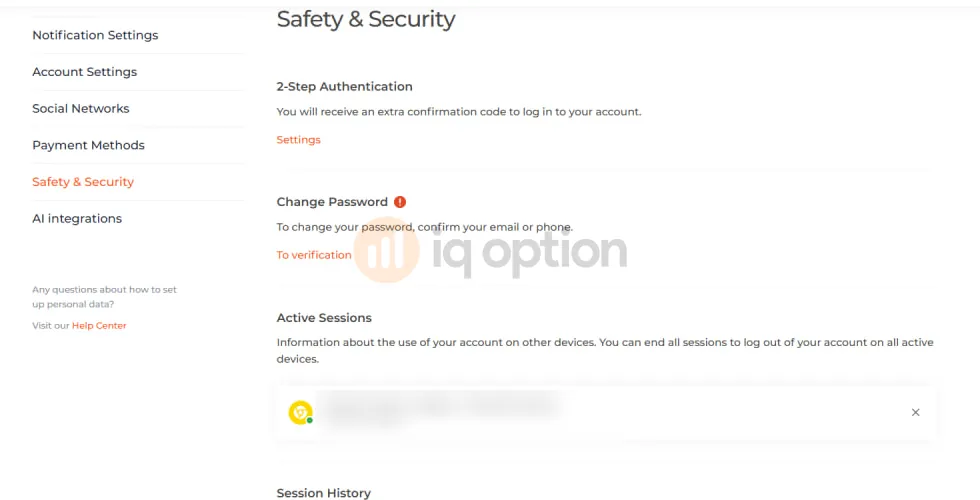
Open your profile and go to Safety & Security, which has three tools for protecting your login.
- 2-step authentication: IQ Option sends an extra confirmation code each time you log in, to your registered phone or email, so turn it on.
- Active sessions: the list shows the devices that are logged in, and one action ends all sessions and signs you out everywhere. Use it if you logged in on a shared computer.
- Session history: you can review recent activity and spot a login you do not recognise.
The steps for a code that does not arrive are not documented, so check that your registered email and phone are correct in the same settings and then contact support. Use a password you do not use anywhere else.
Forgot or change your password
If you forgot it
Press Forgot password on the login page or in the app, enter your registered email and open the recovery link IQ Option sends. Then set a new password of at least 6 characters.
If you want to change it
Log in, open Safety & Security and choose Change Password; IQ Option asks you to confirm your email or phone first.
A phone number cannot be edited in the profile, so to remove an old one, email support and ask them to delete it.
Contact IQ Option support
Live chat runs 24 hours a day, every day, inside the app and the web platform, so you need to be logged in to use it. If you cannot log in, email support@iqoption.com from the address on your account.
IQ Option does not publish a phone number for support, so be careful if someone contacts you from a phone number, a messaging app or a social media account and says they are from IQ Option support. Use the in-app chat or the email above instead.
Payment questions are covered in the deposit and withdrawal guide.
Close or delete your account
Both options are in your profile settings. A temporary closure stops access and trading until you ask support to reopen the account, while permanent deletion removes the account and its data. Close all open positions and pending orders first. You can also ask to download your data as a CSV file.
Withdraw your balance before you close the account. The accounts guide compares the two options in more detail.
Log in or try the demo
Log in if you already have an account, or start with the free demo if you do not.
Log in to IQ OptionFrequently asked questions
How do I log in to IQ Option in the Philippines?
Open iqoption.com/en/login, login.iqoption.com or the official app. Enter the email and password you used to sign up, or press the Google or Facebook button if you registered that way. A Filipino-language page is at iqoption.com/ph/login.
Paano mag login sa IQ Option?
Open the official app or go to iqoption.com/ph/login for the Filipino-language page, then type the email and password from sign-up or use the Google or Facebook button if you signed up with it. If you forgot the password, press Forgot password on the same page.
Why can't I log in to IQ Option?
The usual causes are a wrong password, the login limit after several wrong attempts, a social sign-up with no password set for the desktop app, a document problem on the account, or the message that IQ Option is unavailable in your country. Each one has a fix in the login problems section above.
Can I log in to the desktop app with Google or Facebook?
Not directly, because the desktop app has no social login buttons. Press Forgot password, enter the email linked to your Google or Facebook account and set a password from the email you receive, then log in with that email and password.
How do I sign up for IQ Option?
Go to iqoption.com/en/register, choose the Philippines, enter your email and a password of at least 6 characters, confirm you are 18 or older, accept the terms, pass the captcha and press Create an account. You can also sign up with Google or Facebook.
Does IQ Option have 2-step authentication?
Yes. Turn it on in your profile under Safety & Security, and IQ Option will then ask for an extra confirmation code each time you log in. You can also see your active sessions there and end all of them.
How do I reset my IQ Option password?
Press Forgot password on the login page or in the app, enter your registered email and open the recovery link IQ Option sends. To change the password while logged in, go to Safety & Security in your profile, where you will be asked to confirm your email or phone first.
How do I contact IQ Option support?
Use the 24/7 live chat inside the app or the web platform after you log in, or write to support@iqoption.com. IQ Option does not publish a phone number for support.
Are iqoptions.net and iq-option.com official IQ Option sites?
No. IQ Option does not run them and they are not where you log in. The official addresses are iqoption.com and login.iqoption.com. Type the address yourself or use the official app, and check the address bar before you enter your password.
How do I close or delete my IQ Option account?
Close your open positions and pending orders first, then use the account settings in your profile to close the account temporarily or to request permanent deletion. Support can reopen a temporarily closed account, and the accounts guide covers both options.