Payments guide
IQ Option Deposit and Withdrawal in the Philippines


The minimum deposit is ₱580, and withdrawals start at ₱120 and go up to ₱731 depending on the method, with ₱580 for GCash and Maya. This page covers each method, the fees, verification and what to do when a payment gets stuck, using figures from a Philippine peso account in October 2026.
IQ Option deposit and withdrawal methods at a glance
The minimum deposit is ₱580 (about $10). GCash and Maya are listed first in the cashier, local bank deposits go through InstaPay, and cards, e-wallets and crypto are also available.
| Payment Method | Deposit Limits | Min Withdrawal | Deposit Time | Withdrawal Time | Fee |
|---|---|---|---|---|---|
| GCash | ₱580 to ₱50,000 | ₱580 | 1 to 5 min | 1 to 24 h | 1 free/month, then 2% (max ₱1,500) |
| Maya | ₱580 to ₱50,000 | ₱580 | 1 to 5 min | 1 to 24 h | 1 free/month, then 2% (max ₱1,500) |
| Maya QR | Shown in cashier | Withdraw via Maya | 1 to 5 min | Via Maya | No IQ Option fee |
| QRPH | ₱580 to ₱600,000 (pay from any bank or e-wallet app) | Deposit only | 1 to 5 min | n/a | No IQ Option fee |
| InstaPay bank transfer (PHP VCA / VA PHP) | ₱580 to ₱1,000,000 / ₱580 to ₱250,000 | Deposit only | 1 to 5 min | n/a | No IQ Option fee |
| GrabPay | Shown in cashier | Deposit only | 1 to 5 min | n/a | No IQ Option fee |
| Banks for withdrawal: BDO, BPI, Landbank, PNB, RCBC, Metrobank, Security Bank, UnionBank | Withdrawal only | ₱500 | n/a | 1 to 24 h | 1 free/month, then 2% (max ₱1,500) |
| Visa / Mastercard | Shown in cashier | ₱120 | Instant | Instant on IQ Option’s side (your bank may take up to 21 days) | 1 free/month, then 2% (max ₱1,500) |
| Apple Pay / Google Pay | Shown in cashier | Deposit only | Instant | n/a | No IQ Option fee |
| Skrill, Volet | Shown in cashier | ₱120 | Instant | 1 to 24 h | 1 free/month, then 2% (max ₱1,500) |
| Neteller | Shown in cashier | ₱609 | Instant | 1 to 24 h | 1 free/month, then 2% (max ₱1,500) |
| Crypto (USDT TRC20, BTC, ETH, XRP, USDC BNB, LTC, ADA) | Shown in cashier | ₱731 (no BTC withdrawal) | 5 to 60 min | 1 to 24 h | 1 free/month, then 2% (max ₱1,500) |
| WebMoney WMZ | Withdrawal only | ₱120 | n/a | 1 to 24 h | 1 free/month, then 2% (max ₱1,500) |
You get 1 free withdrawal per calendar month on any method, then 2% capped at ₱1,500, and processing can take up to 3 business days. Withdraw with the method you deposited with where possible (AML rule). If you paid with a deposit-only method such as QRPH, InstaPay, GrabPay, Apple Pay or Google Pay, the withdrawal goes to another method in your own name, such as GCash, Maya or a bank account, and the withdrawal form shows which ones you can use.
How to deposit with GCash, step by step
GCash is the most widely used deposit method and the fastest way to fund your account.
- Log in to your IQ Option account
- Click on your account balance and select ‘Deposit’
- Select GCash from the list of payment methods
- Enter the amount (₱580 to ₱50,000)
- Add a promo code if you have one (optional)
- Click Proceed
- On the GCash page, tap ‘Open in GCash’ or scan the QR in the GCash app
- Confirm the payment. Funds usually arrive in 1 to 5 minutes, with no IQ Option fee
Depositing by bank transfer (InstaPay)
- In the cashier, choose PHP VCA or VA PHP. You get a virtual account number
- In your bank or e-wallet app, choose Send Money via InstaPay
- Choose Other Banks or Wallets
- Set the receiving bank to Netbank
- Paste the virtual account number, enter the amount and confirm
Any InstaPay bank works, and QRPH lets you pay by scanning a QR code with any bank or e-wallet app.
IQ Option charges no deposit fee, though your bank, card issuer or e-wallet may charge its own. Coins.ph and bank wire are not offered. Banks and WebMoney work for withdrawals only, while QRPH, InstaPay, GrabPay, Apple Pay and Google Pay work for deposits only.
Your account currency can be PHP, USD, EUR or GBP and is fixed at your first deposit, so a peso account avoids the conversion charge of up to 4%. Account basics are on our accounts page.
How to deposit with GCash
GCash is the first method in the cashier, and the steps below take a few minutes.
- Log in to IQ Option and click Deposit at the top right.
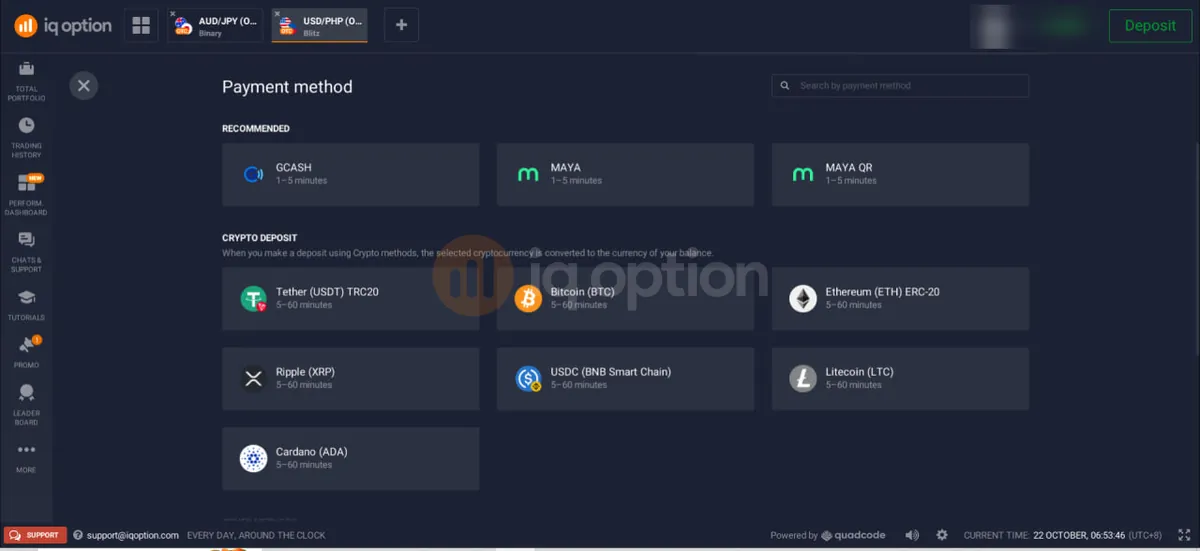
- Under Recommended, choose GCash.
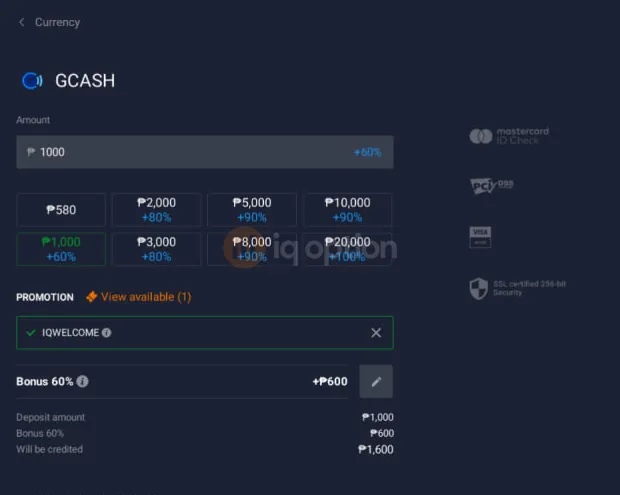
- Enter the amount. GCash accepts ₱580 to ₱50,000, and the first quick-pick button is ₱580.
- If you have a promo code, add it in the Promotion box. You can use one code per deposit.
- Click Proceed. A GCash payment page opens.
- On your phone, tap Open in GCash. On a computer, log in to GCash on your phone and scan the QR code with its QR scanner.
- Confirm the payment in the GCash app. The money usually reaches your balance in 1 to 5 minutes.

Deposit with Maya, Maya QR and QRPH
All three take about 1 to 5 minutes. The cashier steps are the same as for GCash (pick the method, enter the amount, add a code if you have one, then click Proceed), but what happens next differs.
Maya
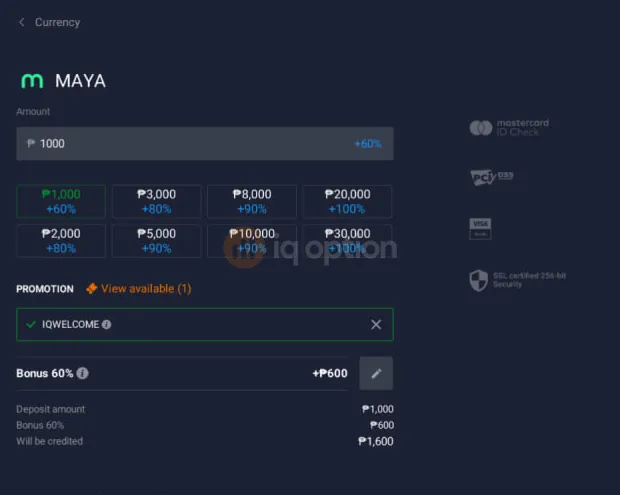
Maya takes ₱580 to ₱50,000 and the quick-pick buttons start at ₱1,000. After Proceed you land on a Maya login page, where you sign in with your mobile number and password and then confirm the payment.
Maya QR
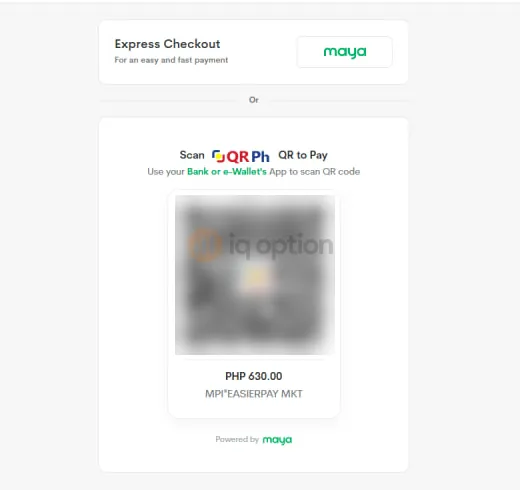
Maya QR opens a Maya Business checkout, where you can use Express Checkout with Maya or scan the QR Ph code with any bank or e-wallet app.
QRPH
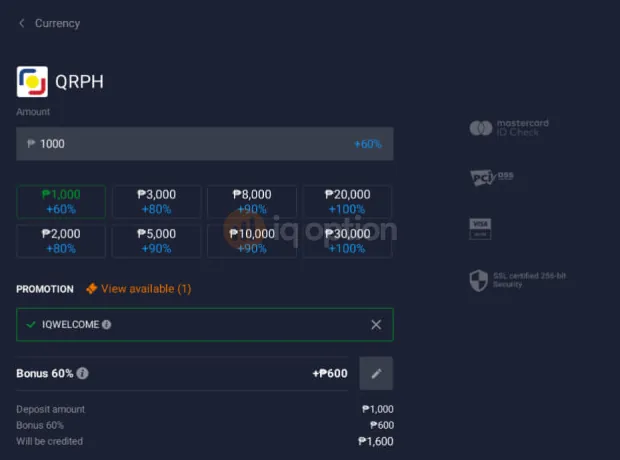
QRPH takes ₱580 to ₱600,000 and gives you a QR page. Take a screenshot of the code and pay with the QR function of any bank or e-wallet app that supports QR Ph. QRPH is for deposits only, so to get money out you pick another method in your own name.
Bank transfer by InstaPay and GrabPay
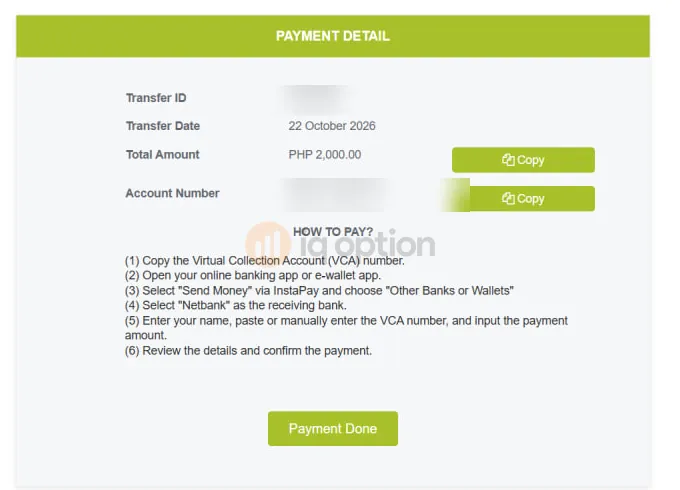
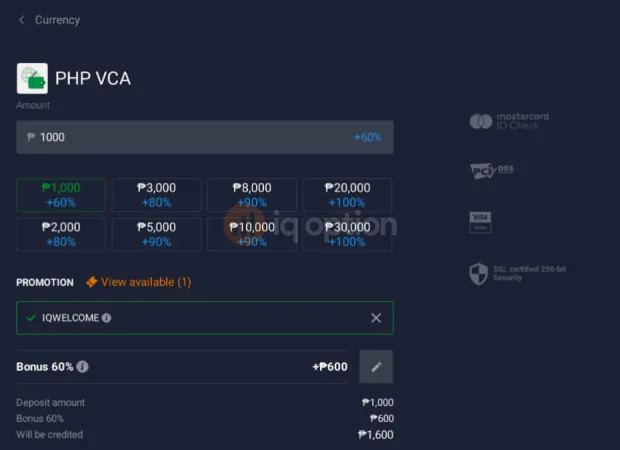
IQ Option has no direct BDO or BPI deposit button. Bank deposits go through InstaPay with two cashier options, PHP VCA and VA PHP, and a processor called Help2Pay runs the payment page.
- PHP VCA takes ₱580 to ₱1,000,000.
- VA PHP takes ₱580 to ₱250,000.
- Both take about 1 to 5 minutes.
After Proceed, the page shows a virtual account number, which you pay like this.
- Copy the virtual account number.
- Open your online banking app or e-wallet app.
- Choose Send Money via InstaPay, then Other Banks or Wallets.
- Choose Netbank as the receiving bank.
- Enter your name, paste the virtual account number and enter the amount.
- Review the details and confirm the payment.
GrabPay
GrabPay takes about 1 to 5 minutes and is for deposits only. The Help2Pay page asks for the phone number registered with your online banking or e-wallet app, so have it ready. The cashier does not show a limit for GrabPay.
Cards, Apple Pay, Google Pay, e-wallets and crypto
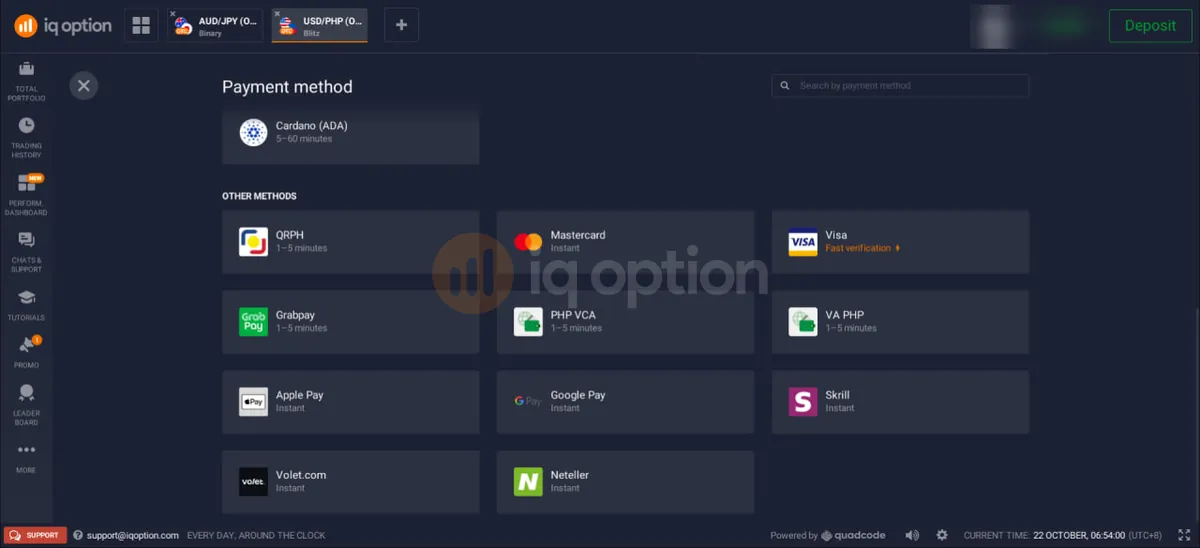
- Mastercard is instant, and Visa is marked Fast verification in the cashier.
- Apple Pay and Google Pay are instant and work for deposits only.
- Skrill, Volet and Neteller are instant, and you can withdraw to them as well.
- Crypto takes 5 to 60 minutes. The coins are USDT (TRC20), BTC, ETH (ERC-20), XRP, USDC (BNB Smart Chain), LTC and ADA, and the cashier converts the coin to the currency of your balance. BTC is deposit only.
Card payments must come from a card in your name. Cards also change how withdrawals work, as the next sections explain.
How to withdraw from IQ Option
A withdrawal only works on a verified account, so verify before you need the money.
- Finish verification first. Withdrawals are not processed on an unverified account.
- Log in and open the withdrawal page from the payments menu.
- Choose the method you want to receive the money with. It must be an account in your own name.
- Enter an amount at or above the minimum for that method (see the table below).
- Confirm the request. The amount leaves your trading balance straight away.
- Follow the status. It moves from Requested to In process to Funds sent.
The three statuses mean the following.
- Requested: the request was submitted and the amount left your trading balance.
- In process: IQ Option is reviewing and handling it.
- Funds sent: IQ Option has passed the money to your payment provider or bank.
Use your own account, and match the deposit method when you can
Money goes back to accounts in your name. If you deposited by card, the amount you deposited goes back to that card, with card refunds available within 180 days of the deposit, and anything above that, such as profit, goes to an e-wallet or a bank account. QRPH, InstaPay (PHP VCA and VA PHP), GrabPay, Apple Pay and Google Pay are deposit only, so withdraw to another method in your own name. The withdrawal form shows which methods you can use.
One withdrawal can therefore be split in two, because the deposit refund and the extra amount are separate payments. The bank can take up to 21 calendar days to show a card refund, and if it takes longer you can send a bank statement to docs@iqoption.com or write to live chat. Card details are in the accounts guide.
Withdrawal methods, minimums and times
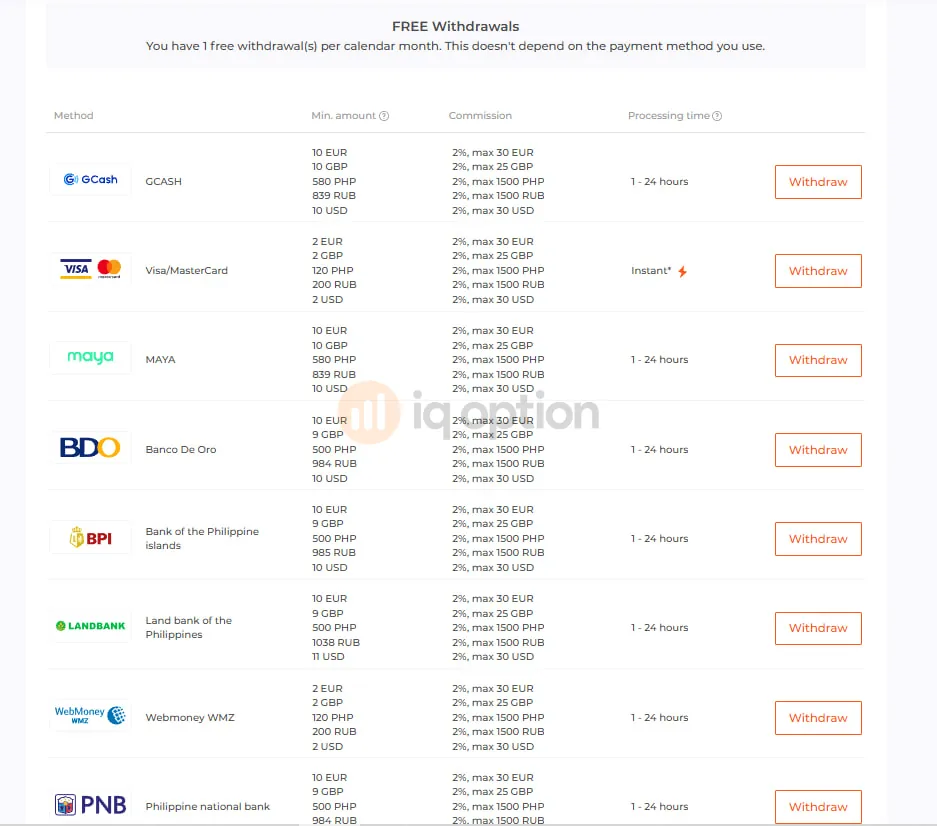
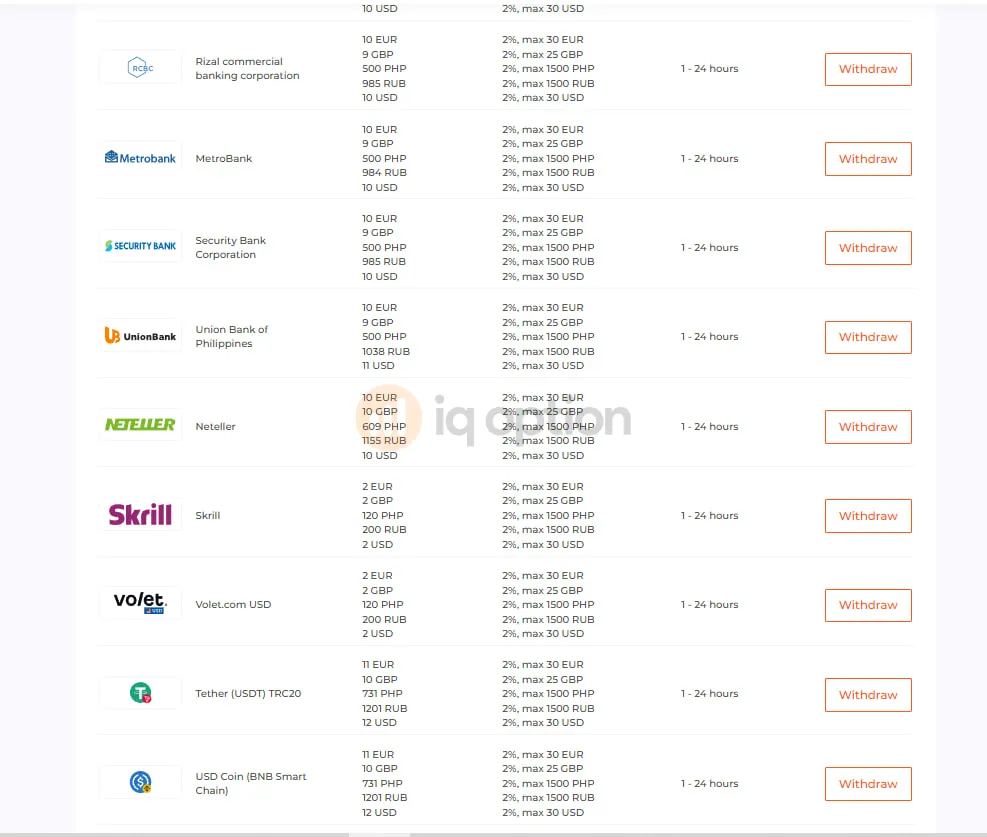
IQ Option's public withdrawal conditions page lists processing of 1 to 24 hours on its side and says to allow up to 3 business days, and your bank or e-wallet can add time after that. The minimums below are in pesos.
| Method | Minimum | Processing |
|---|---|---|
| GCash, Maya | ₱580 | 1 to 24 hours |
| BDO, BPI, Landbank, PNB, RCBC, Metrobank, Security Bank, UnionBank | ₱500 | 1 to 24 hours |
| Visa, Mastercard | ₱120 | Instant on IQ Option's side, bank may take up to 21 days |
| Skrill, Volet USD, WebMoney WMZ | ₱120 | 1 to 24 hours |
| Neteller | ₱609 | 1 to 24 hours |
| USDT (TRC20), USDC (BNB), ETH, XRP, ADA, LTC | ₱731 | 1 to 24 hours |
There is no BTC withdrawal. WebMoney works for withdrawals only.
Deposit and withdrawal fees
You pay nothing to deposit, and the first withdrawal in each calendar month is free whichever method you use. The full fee breakdown in our review covers trading costs.
| Item | Cost |
|---|---|
| Deposit | No fee from IQ Option |
| First withdrawal of the month | Free |
| Next withdrawals in the same month | 2%, up to a maximum of ₱1,500 |
| Currency conversion | Up to 4% when you deposit or withdraw in a currency other than your account currency |
| Inactivity | €10 a month after 90 days with no trade or deposit |
Banks, card issuers and e-wallets set their own charges, which IQ Option does not control.
Verification before your first withdrawal
You need a verified account to withdraw, and IQ Option can ask for documents at any time, so verifying early avoids a delay later. Account steps are also on our accounts page, and sign-in help is on the login page.
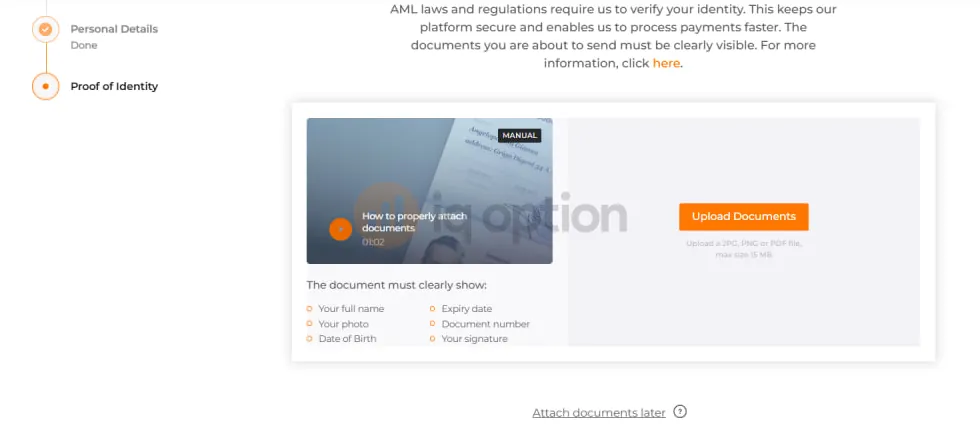
On screen the steps are as follows.
- Personal details.
- Email confirmation with a code. You can skip it and do it later.
- Proof of identity. There is an Attach documents later option.
The document must show your full name, photo, date of birth, expiry date, document number and signature, and you can upload a JPG, PNG or PDF up to 15 MB. A Philippine passport, driver's licence, SSS ID, UMID or PhilSys National ID works as identity proof.
IQ Option can also ask for proof of address, such as a utility bill, a bank statement or a barangay certificate dated within 3 months, and for a card it can ask for a photo that shows the first 6 and last 4 digits with the CVV covered.
IQ Option's terms allow up to 10 business days to review documents. Clear photos with all corners visible make a quick decision more likely, but no turnaround is promised.
Deposit bonuses and withdrawals
A bonus has a trading target: you must trade 40 times the bonus amount before you can withdraw it. Only options volume counts, which means Blitz, Turbo, Digital and Binary, and CFDs do not count.
If you withdraw before the target is met, the bonus is cancelled along with the profit made with it, while your own deposit and any profit made on your real balance stay yours. Codes work on every deposit method and through our links, with one code per deposit.
Example: ₱1,000 gets +60%, which is ₱600, so ₱1,600 is credited. Reach the 40x target within 30 days.
Use IQWELCOMEExample: ₱1,000 gets +₱1,000, so ₱2,000 is credited. Reach the 40x target within 7 days.
Use 2026IQThe full tier table, the calculator and the rules are on the promo codes page.
Common problems and fixes
Run through this checklist before each withdrawal, because an unticked box is a likely cause of a delay or rejection.
If something still goes wrong, find your case below.
The name on the account does not match
The name on your bank, GCash or Maya account differs from the name on your IQ Option profile.
Fix: use accounts in your own name only, and contact live chat to correct the spelling if your name differs in IQ Option.
You paid or withdrew with a third-party account
A payment from or to another person's account is rejected.
Fix: move to a method registered in your name instead of asking a friend or relative to pay for you.
A deposit was rejected
Common causes are a wrong 3-D Secure code, a missing country in your profile, a bank blocking international payments, or an account that is not yours.
Fix: enter the right SMS code, add your country of residence, ask your bank to allow international payments and use your own account or card.
The account is not verified
Documents are missing, blurry or cropped, so verification is not complete.
Fix: upload clear photos in JPG, PNG or PDF up to 15 MB with all corners visible, then try the withdrawal again.
You picked a deposit-only method
QRPH, InstaPay, GrabPay, Apple Pay and Google Pay cannot receive withdrawals.
Fix: choose GCash, Maya, a bank or another method in your own name. The form shows which ones are available.
A card refund has not arrived
Your bank can take up to 21 calendar days to show a card refund.
Fix: if it takes longer, send a bank statement to docs@iqoption.com or write to live chat, and remember that only the deposited amount returns to the card while the rest goes to an e-wallet or bank.
A bonus target is not finished
Withdrawing before you trade 40 times the bonus cancels the bonus and the profit made with it.
Fix: finish the target in options, or accept the cancellation. Your own deposit and real-balance profit stay yours.
The status stays on In process
IQ Option may be reviewing the account or waiting for a document.
Fix: check the notifications and chat in the platform, then send what support asks for. Allow up to 3 business days.
Support is open 24/7 by live chat after you log in and at support@iqoption.com, though no phone number is published.
Try the demo before you deposit
The demo account is free and has $10,000 in virtual funds, so you can see the cashier and the platform without paying anything. Our beginner guide shows how a first trade works, and the download page lists the apps.
Open an IQ Option accountFrequently asked questions
What is the minimum deposit on IQ Option in the Philippines?
The minimum deposit is ₱580 (about $10) on a Philippine peso account, and welcome bonus tiers start a little higher at ₱630.
What is the minimum withdrawal?
It depends on the method. GCash and Maya need ₱580. Philippine banks (BDO, BPI, Landbank, PNB, RCBC, Metrobank, Security Bank and UnionBank) need ₱500. Visa or Mastercard, Skrill, Volet USD and WebMoney WMZ need ₱120. Neteller needs ₱609. Crypto needs ₱731.
How long does an IQ Option withdrawal take?
IQ Option's withdrawal conditions page shows 1 to 24 hours for processing on its side and says to allow up to 3 business days, and your bank or e-wallet may add time. A card refund can take up to 21 calendar days to show in your bank.
Can I withdraw to GCash?
Yes. GCash is a withdrawal method with a ₱580 minimum and a 1 to 24 hour processing time, and the first withdrawal of each calendar month is free. The GCash account must be in your own name.
Can I withdraw from IQ Option without verification?
No. Withdrawals need a verified account, and IQ Option can ask for more documents at any time, so verify early to keep a withdrawal from being held up. The steps are in the verification section above.
What are the IQ Option deposit and withdrawal fees?
IQ Option charges no deposit fee, and one withdrawal per calendar month is free on any method. After that the fee is 2%, up to a maximum of ₱1,500, and converting between currencies can cost up to 4%. Your bank, card issuer or e-wallet may add its own charges.
Can I deposit with QRPH or InstaPay?
Yes. QRPH takes ₱580 to ₱600,000, and InstaPay deposits go through PHP VCA (₱580 to ₱1,000,000) or VA PHP (₱580 to ₱250,000). These methods are for deposits only, so you withdraw to another method in your own name, such as GCash, Maya or a bank, and the withdrawal form shows which methods are available.
Why was my IQ Option deposit rejected?
The usual causes are a payment from an account that is not in your name, a wrong 3-D Secure code on a card, a missing country in your profile, or a bank that blocks international payments. Check each one and try again with an account or card in your own name, and contact live chat if it still fails.
How long does a card refund take?
When you withdraw to a card, the amount you deposited goes back to that card, and card refunds are available within 180 days of the deposit. Your bank can take up to 21 calendar days to show it, and if it takes longer you can send a bank statement to docs@iqoption.com or through live chat.
Can I change my account currency?
No. You can choose PHP, USD, EUR or GBP, but the choice is fixed at your first deposit, and a peso account avoids the currency conversion charge of up to 4% when you pay from GCash, Maya or a Philippine bank.
Is there a deposit fee?
No. IQ Option does not charge a deposit fee on any method, although the company behind your payment method, such as a bank or card issuer, may charge its own, so check with it.
Paano mag withdraw sa IQ Option?
Verify your account, open the withdrawal page, choose GCash, Maya or a Philippine bank in your own name, enter at least the minimum for that method and confirm. The status goes from Requested to In process to Funds sent, and the first withdrawal each calendar month is free.